


Genuine Titan OEM | Main Assembly Replacement Parts
Shop Titan ED655 Plus Main Assembly Parts
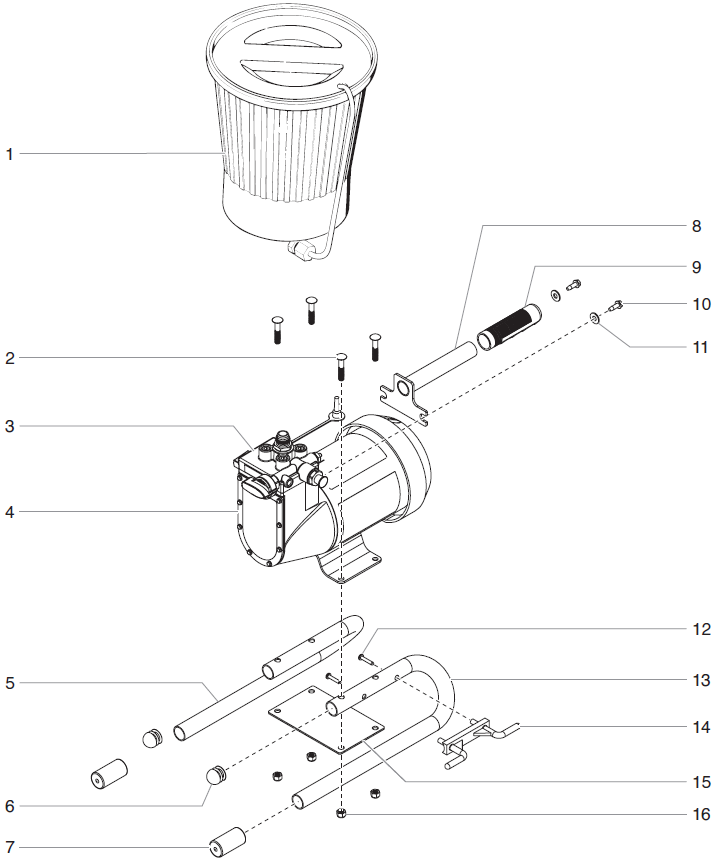
Find the replacement item your repair requires with Titan ED655 Plus Main Assembly parts from AllTitanParts. Compare the exploded drawing with your equipment, identify the affected component and review its part number and product details before ordering.
Main Assembly Overview
Replace Damaged Components with the Correct Parts
A damaged support component, worn grip or missing fastener calls for accurate identification before replacement. Use the assembly drawing to locate the item and compare its description with the component fitted to your equipment.
Check the full model identification and any previous repairs that may affect selection. Review quantities and included items carefully. A main assembly category is a product directory, so an individual purchase should not be assumed to contain the entire assembly.
OEM Parts Directory
Titan ED655 Plus Main Assembly Parts List
Match the replacement number and drawing reference before selecting your item.
| Diagram Ref. | Titan Part Number | Product |
|---|---|---|
| 1 | 0288144 | Hopper Assembly |
| 5 | 0508271 | Leg, Left Hand |
| 7 | 0555513 | Tube Cap |
| 9 | 590-068 | Black Grip Handle |
| 10 | 0508276 | Taptite Screw |
| 11 | 9820206 | Flat Washer |
| 13 | 0508270 | Leg, Right Hand |
| 15 | 0508267 | Plate Nut |
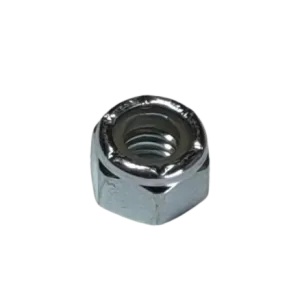
| 16 | 9811122 | Nut |
The directory covers nine displayed products. Confirm any drawing component not included in this table before ordering.
Inspection Before Replacement
Inspect Support Parts, Grips and Securing Hardware
Support Components
Check for physical damage, deformation and insecure attachment. Match side-specific replacements to the drawing rather than assuming opposite-side components are interchangeable.
Grips and Caps
Inspect accessible components for wear, splitting or missing pieces. Use the designated replacement and follow the specified installation procedure.
Fasteners and Washers
Check hardware condition and installation requirements. Thread dimensions, length and other specifications matter when selecting a replacement.
Material Container
Inspect the installed container and connection areas according to the equipment instructions. Compare assembly contents before deciding whether an individual component or assembly is required.
Replacement Parts Buying Guide
Choose the Correct ED655 Plus Main Assembly Part
- Confirm your equipment. Record the model and serial information.
- Identify the damaged item. Inspect the component according to the service instructions.
- Compare the drawing. Match the part number, location and orientation where applicable.
- Review included items. Check quantities and any associated hardware required separately.
Routine Equipment Care
Check the Equipment Before Returning It to Service
Follow the manufacturer's maintenance schedule and inspect accessible support components and securing hardware as directed. Address damaged parts or loose attachments before operating or moving the equipment.
Keep records of repairs and installed replacement numbers. Accurate service information makes future identification easier and helps account for changes made during earlier maintenance.
Related ED655 Plus Parts
Explore Other Assembly Categories
Prepare the Equipment Safely Before Service
Switch off the equipment, disconnect electrical power and complete the manufacturer's pressure-relief procedure before servicing fluid components. Secure the equipment before removing support parts. Follow the instructions for installation, reassembly and restart, and restore all required securing hardware before use.
Find Your Replacement Component
Order ED655 Plus Main Assembly Parts
Confirm the required item and review its replacement details before checkout.
Shop Main Assembly PartsFrequently Asked Questions
Titan ED655 Plus Main Assembly FAQ
Does each product include the complete main assembly?
This category contains individual replacement products. Review the selected description to confirm what your purchase includes.
How do I choose the correct replacement?
Confirm your equipment information and compare the component's part number, description and drawing location before ordering.
Can opposite-side support components be substituted?
Do not assume they are interchangeable. Select the specified part for its orientation and location in the assembly drawing.
Can I use a similar-looking fastener?
Use the designated replacement. Thread dimensions, length and installation requirements determine suitability.
What information helps with parts identification?
Provide the full model name, serial number, drawing reference and existing part number. A clear photograph may also help identify the component.
Need Help Finding an ED655 Plus Main Assembly Part?
Have your equipment information and component reference ready when contacting AllTitanParts.
713-931-0006